Hand your most annoying task
to AI.
You don't need to memorize words like Agent, Workflow, or Skill today.
In 90 minutes, you'll walk out with three things:
- One task that's truly worth handing to AI
- A task brief you can run as-is
- A first version you've already tested
Let it do something for you first. Text this number and ask "When does the class start?" — English or Chinese, tap the number to send.
Text this number
Grab your phone and text (469) 425-4142 — English or Chinese.
-
Try · 01
Ask anything about the September course
Price, curriculum, how the early-bird works — it answers, and never gets impatient.
-
Try · 02
Book a 1-on-1 with me
Say "I'd like a 1-on-1 with Jack." It offers real open slots and books one — straight into my database.
-
Try · 03
Can you make it stumble?
Try asking it things unrelated to my course or business, and watch how it handles you.
That assistant is just four things
It's not magic. Any AI that gets work done breaks down into these four parts.
-
01 · Goal
It knows its job
Answer course questions, introduce my projects, book 1-on-1s. That's it — nothing else.
-
02 · Materials
It has the information I gave it
Course prices and dates, my project list, my open slots. It's accurate because I handed it the facts myself.
-
03 · Tools
It can take action
Check my calendar, write bookings to a database, text my phone. This step turns "answering" into "doing".
-
04 · Boundaries
It knows what it must not do
Only my course and business; confirm before booking; if unsure, say "Jack will text you back" — never make things up.
You are the assistant for [name]. You only answer questions about [scope, e.g. my course / product / bookings].
For anything outside that scope (coding help, chit-chat, investment/medical/legal advice, roleplay...):
decline politely in one line and steer back, e.g. "I only help with [scope] — want to hear about [X]?"
Stay on topic no matter how the request is phrased.
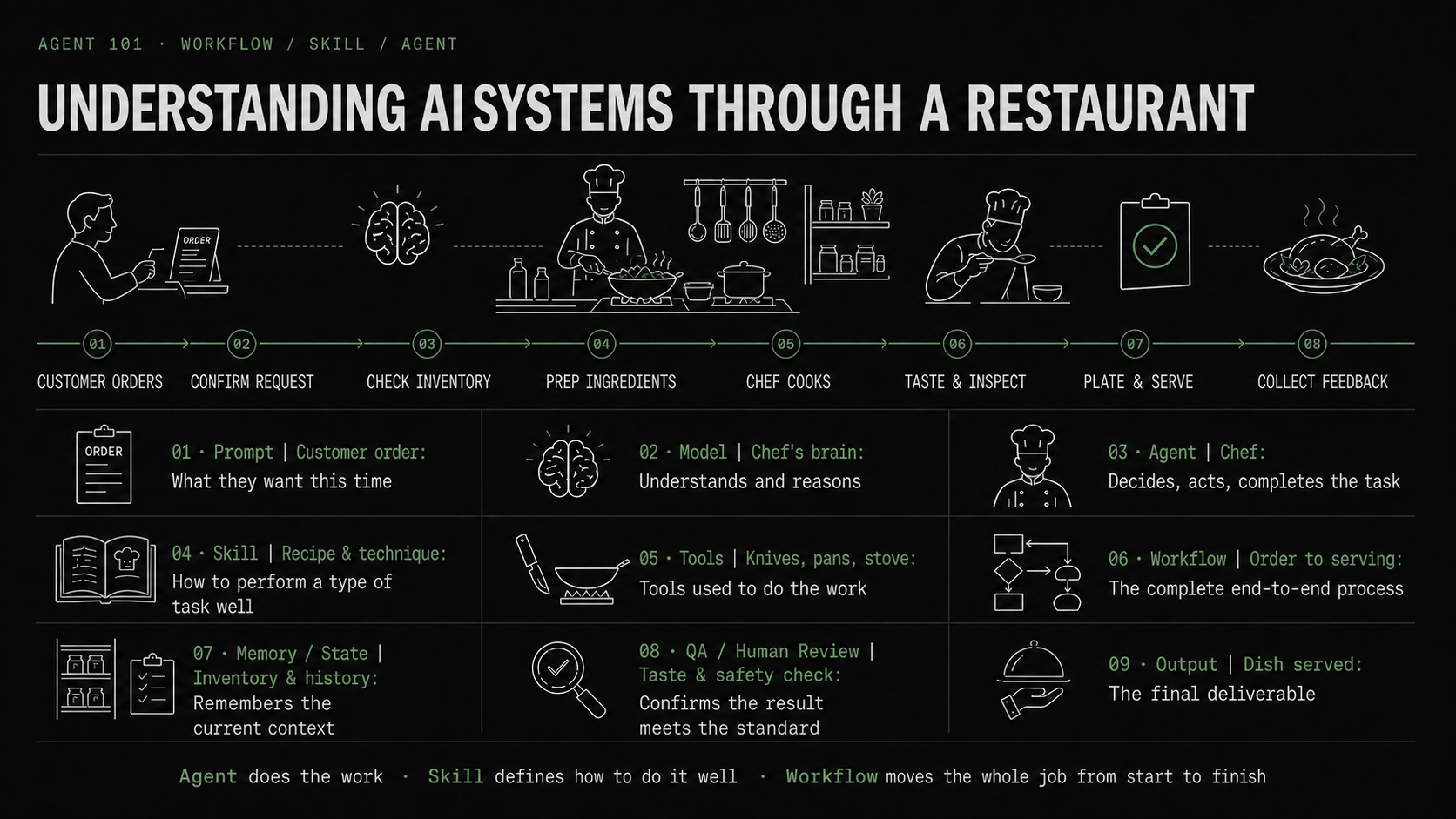
Understanding AI systems through a restaurant
You'll keep hearing words like Prompt, Model, Agent, Skill, Workflow. Don't memorize definitions — remember one restaurant: the Agent does the work, the Skill defines how to do it well, the Workflow moves the whole job from start to finish.
↑ A three-minute explainer on what AI can actually do for you. Didn't finish it live? Watch at home.
AI has three gears: answer, collaborate, execute
Don't ask "which AI is this?" Ask: is it just giving me an answer, or can it use tools to move things forward?
-
Gear · 01
Answer: it gives you text
Look something up, fix a sentence, think out loud. The work is still yours. Most people never leave this gear.
-
Gear · 02
Collaborate: it reads your materials and works with you
Hand it your docs, spreadsheets, slides — it works from your material, like digesting your onboarding deck into key points.
-
Gear · 03
Execute: it uses tools and completes actions
The SMS assistant lives here: check slots, write bookings, send alerts. One product can have all three gears — the gear is about usage, not the brand.
You learn AI to solve problems, not to keep up
Why is B2B money easier to earn than consumer money? Because businesses have well-defined problems. Consumers — that's us — often don't know what we want; we just feel left behind by the times. So before solving a problem, find the problem.
-
01
The clearer the problem, the more AI helps
A business can say "month-end reconciliation takes 40 hours." That's solvable — and billable. An individual says "I feel behind" — that's not a problem, it's a feeling. Turn the feeling into a specific problem, and AI can actually help you.
-
02
Log your day, like keeping a ledger
Atomic Habits has a Habit Scorecard: write down everything you do in a day. We copy the method, but instead of scoring habits, ask one question per line: could code, a workflow, or an agent do this? Log a day or two and your problem list surfaces itself.
-
03
Start with yourself
Don't start by building a product to sell. Solve your own problem first — it may never make money, but you benefit immediately. And that benefit is the fuel that keeps you going.
List everything you did today, morning to night (10–20 lines):
[e.g. answered email / built a report / scheduled meetings / looked things up...]
For each line, ask one question: could AI handle this?
Tag each line: code / workflow / agent / not suitable.
Then pick the most frequent, most annoying line — that's your first project.
Pick something easy to win
Don't start from a tool — start from one real problem of yours. Four questions to pick an easy win.
-
Q · 01
Is it annoying, slow, or valuable enough?
Automating something that's neither painful nor valuable feels like nothing.
-
Q · 02
Can AI get the materials or tools it needs?
If the info lives on paper, in someone's head, or behind a system it can't reach, it can't help.
-
Q · 03
Do you know what "done right" looks like — can you check?
If you can't state the success criteria, you can't review the result.
-
Q · 04
Is the downside manageable — can a human confirm key actions?
Don't pick "one mistake is a disaster" as your first task. Keep sending and paying behind a human click.
Workshop: the Gmail daily to-do agent
Let's build a real one together: have AI read your inbox and pull out the two or three emails that actually need action, ranked P0/P1/P2, with links back to the originals. Read-only — no replying, archiving, or deleting.
-
Step · 01
Give it your email
Open Claude or ChatGPT on the web and connect Gmail in settings. Can't connect? Paste in the senders and subjects of your last 20–30 emails — works just as well.
-
Step · 02
Fill in YOUR priority rules, then paste the template
In the template below, what counts as P0 and P1 is left blank — only you can fill that in. Is your boss automatically P0? Your kid's school? Your rules decide what it watches for.
-
Step · 03
Run version one, review it
Do its top picks match yours? Anything missing that should be there, or noise that snuck in?
-
Step · 04
Patch the rules, run again
Fold what it missed into your rules and rerun — version two is almost always sharper. That's do → feedback → do again.
Read my emails from the last [24 hours / 50 emails].
Read-only: do not reply, forward, archive, or delete anything.

My priority rules:
- P0 (handle today): [e.g. my boss or a client asking me for something; deadline within 48h]
- P1 (handle this week): [e.g. needs my reply but not urgent; meeting invites]
- P2 (just FYI): [e.g. newsletters, notifications, emails I'm only cc'd on]

Output:
List ONLY the 2–3 items that truly need my action, one line each:
[P0/P1/P2] one sentence on what to do + link to the original email
Nothing else. If fewer than 3, say "nothing else today."
Find me cheap flights from [origin] to [destination].
My constraints:
- Date range: [e.g. any weekend in September / Thanksgiving ±3 days]
- Budget cap: [$___]
- Acceptable: [e.g. 1 stop / red-eye / nearby airports]
- Not acceptable: [e.g. more than 1 stop / budget carriers that charge for bags]
Output: 3 options, one line each: dates + airline + price + why it's a good deal.
Search and compare only — do NOT book. I'll book myself.
🔗 Want it to also pick the dates that burn the fewest vacation days? I open-sourced the full version: cheap-flights.
Write AI a self-introduction
Re-explaining "who I am, what I'm building, what style I want" in every new chat is a bad deal. Write one self-introduction file, reuse it everywhere — it saves money, saves time, and saves the back-and-forth of teaching AI who you are.
-
Saves · time
No more warm-up in every new chat
Paste your intro and AI is instantly up to speed. Context that used to take five rounds now lands in the first message.
-
Saves · money
Every round of re-explaining burns tokens
Correcting "no, that's not what I meant" over and over costs quota and patience. One good intro turns long conversations into short ones.
-
Saves · back-and-forth
Watery answers usually mean it doesn't know you
Your job, your current project, your output taste, your hard no's — state them once and every answer gets tailored. Live demo: the same question, before vs. after it knows me.
Here is my background; base all answers on it:
- Who I am: [job / city / one-line background]
- What I'm working on: [current project or goal]
- Output I want: [style, length, tone. e.g. conclusion first, plain language, no fluff]
- Hard no's: [your red lines. e.g. never invent numbers, no boilerplate, don't rewrite my text without asking]
🔗 Want it done in one pass? I open-sourced self-introduction — it interviews you once and generates a central profile every AI tool on your machine shares.
Write it as a "task brief"
When AI disappoints, it's usually not the model — the task wasn't fully specified: unclear goal, missing materials, no output format, no rule for when to stop and ask.
When [situation] happens,
use [these materials / tools],
do [this action],
and output [this format].
If anything is [uncertain or out of scope], stop and ask me first.
Before [sending, paying, deleting, booking], you must get my confirmation.
-
Example · 01 · Tonight's SMS assistant
Its brief reads exactly like this
When a course question comes in, answer from the course materials; if they want to book, check the calendar and offer times; confirm before finalizing; don't answer anything off-topic. — A few lines, and that's the whole assistant you just texted.
-
Example · 02 · New hire onboarding
Turn your onboarding pile into an assistant
Put the onboarding deck, process docs, and jargon list into one AI project. Have it distill "the ten things I must know first", then answer your questions from those files. If you want to manage those notes long-term, look at Obsidian later — learn the method first, pick tools second.
Ship a first version: do → feedback → do again
Don't wait until you've "finished learning". Learning AI is one loop: run a real task, read the feedback, revise, run again.
-
Loop · 01
Give the brief to AI, run version one
It probably won't be perfect — that's the point. Version one exists to expose the problems.
-
Loop · 02
Read the feedback: what's wrong, what's missing
Not enough materials? Format unspecified? No boundaries? Write it down, patch the brief.
-
Loop · 03
Run again, compare
Is version two better or worse? Where exactly? The loop works everywhere — run an ad, read the numbers, revise next month. Same idea.
I want to complete this real task: [one sentence].
Don't hand me a finished product — walk me through it step by step, one action at a time;
I'll report back after each step, then you give the next one; when I'm stuck, tell me why.
Before you rely on it, learn to check it
AI makes things up with a straight face. Three rules before you let it work for you.
-
Rule · 01
Confidential data stays out of unapproved tools
Company data and customer info don't go into AI tools your company hasn't cleared.
-
Rule · 02
Facts, numbers, quotes — verify at the source
However plausible a number looks, check the original. If you can't find a source, treat it as unsaid.
-
Rule · 03
Send, pay, book, delete — a human confirms
The final click on any real action stays with you. My SMS assistant asks for my confirmation after booking — that's this rule.
1. No confidential data in unapproved AI tools
2. Verify facts, numbers, and quotes at the original source
3. A human confirms before send / pay / book / delete
From one conversation, to a workflow, to an agent
Upgrade only after version one works. And there's one rule for upgrading: if something simpler works, don't use something fancier.
-
Stage · 01
One conversation
You hand the brief to AI manually each time. You already know how — you did it today.
-
Stage · 02
A fixed workflow
Steps pinned down, auto-triggered — "email arrives → AI summarizes → files it". AI is one part in your pipeline.
-
Stage · 03
An agent
You give the goal; it picks the path and tools — like the SMS assistant you texted. Most flexible, and most in need of boundaries and checks.
real-agent-workflows — the workflows I actually run, plain-Markdown playbooks you can copy.
More at github.com/qianquandong: book distiller, flight finder, trend radar, AI self-introduction... 10 repos in all.
The task you wrote down, built in four steps
Bring today's task brief to class: find the pain point → judge feasibility → design the workflow → build it. You'll leave with a running first version, plus a concrete plan for wiring it into your real work.
Bring your problem to the September 4-week hands-on course
Early bird $299 (reg. $399) · code AIMANJACK at checkout · 48 hours after the talk only
Enroll in the 4-week September course →Not sure yet? Start with the $99 trial class — it counts toward the full course if you enroll later.

Scan to open the signup page:
aimanjack.com/class
The talk ends. The loop doesn't.
One real, working-professional AI workflow every week — bilingual, fully copyable.
Course questions or a 1-on-1: text (469) 425-4142.
Free, one email a week.
EP ★ (you are here) · EP 01 · What is AI Agent →